
The MangoesToMetro ordering plugin takes orders from anyone on the internet, stores a photo of their bank transfer, walks each order through a delivery pipeline, and emails a spreadsheet to a government agency every morning.
None of those four things is difficult on its own. What made it interesting is that all four are places to get security wrong.
This post is how I built it. I have written it for someone who knows PHP but has never written a WordPress plugin, so every WordPress-specific term gets defined the first time it turns up.
The customer-facing version of the same system is the ordering system case study.
An order has eight states and cannot skip any of them
An order is not just a row in a table. It is a thing that moves. Someone places it, we verify the payment, we pack it, PhilPost collects it, it arrives.
The obvious way to build that is a status column and a lot of code that writes to it. Any function anywhere can set any value. That works right up to the day a cancelled order shows up as “out for delivery” and nobody can explain how.
So, first term. A state machine is two things written down together. One is the complete list of states a thing is allowed to be in. The other is the set of moves permitted between them. The point is that both live in one place, and get checked in one place, instead of being spread across every function that touches the record.
The table that expresses the permitted moves is the transition matrix. A state with no moves out of it is a terminal state. Once an order is there, that is where it stays.
Here is the whole thing, as it appears in the plugin:
private const TRANSITIONS = [
    'pending'          => [ 'confirmed', 'delayed', 'cancelled' ],
    'confirmed'        => [ 'preparing', 'delayed', 'cancelled' ],
    'preparing'        => [ 'shipment',  'delayed', 'cancelled' ],
    'shipment'         => [ 'out_for_delivery', 'delayed', 'cancelled' ],
    'out_for_delivery' => [ 'order_received',   'delayed', 'cancelled' ],
    'delayed'          => [ 'confirmed', 'cancelled' ],
    'order_received'   => [],
    'cancelled'        => [],
];
Every key on the left is a state an order can currently be in, and there are eight of them. Every array on the right is the complete set of states it may move to next, so anything not in that list is refused. An empty array means nothing further is possible.
Three things follow from the table that are worth saying out loud.
Terminal states really are terminal. order_received and cancelled both map to []. Nobody can reopen a completed order or quietly revive a cancelled one.
Nothing can skip a stage. There is no route from pending to out_for_delivery. A customer looking at a status is always looking at one the operation actually reached.
delayed is a holding state, not a stage. It is reachable from all five active states, and apart from cancelling, its only way out is back to confirmed. So a shipment stalls, someone marks it delayed, and when it resolves the order re-enters the pipeline at confirmed and walks forward from there again. It does not resume where it stopped. That is a real cost, taken deliberately: the alternative was a delay state per stage, or a second column remembering where each order had been. Modelling delay as a step in a line would have been worse still, since it would force a fake ordering onto something that is not sequential.
Why a table beats scattered if statements
The matrix is a private const on one class. Every status change goes through one function that reads it:
private static function validate_transition( $order, string $new_status, string $philpost ) {
    $current_state = (string) $order->order_status;
    $valid_next    = self::TRANSITIONS[ $current_state ] ?? [];

    if ( ! in_array( $new_status, $valid_next, true ) ) {
        return new WP_Error(
            'invalid_transition',
            sprintf( 'Invalid transition from %s', $current_state ),
            [ 'status' => 422 ]
        );
    }

    $has_existing_tracking = ! empty( $order->philpost_tracking );
    if ( $new_status === 'shipment' && $philpost === '' && ! $has_existing_tracking ) {
        return new WP_Error(
            'missing_philpost_tracking',
            'PhilPost tracking number is required when setting status to Shipment.'
        );
    }

    return true;
}
Two lines deserve a look. The first is $valid_next = self::TRANSITIONS[ $current_state ] ?? [];, where that ?? [] matters more than it appears to. A state not in the table falls back to an empty list, which permits nothing. An unrecognised status fails closed rather than becoming a free-for-all.
The second is the shipment branch. That is a business rule, not a permission check: you cannot mark an order shipped without a PhilPost tracking number, unless it already has one. It lives here rather than in the dashboard, so it holds no matter what triggers the change, whether that is the admin screen today or a REST endpoint or a WP-CLI command later.
Now the comparison. Scattered if statements leave you with no single place to read, so answering “can a delayed order be cancelled?” means grepping. They leave you with no single place to change either, so adding a state means finding every check and hoping you found them all. And they tend to grow rules that depend on which screen you came in through, because each entry point invented its own.
The table gives you one place to read and one place to change. That is the entire argument, and it is enough.
One honest caveat: the matrix is not consulted on every save. If the submitted status equals the current one, the code treats it as a note-only or tracking-number-only edit, skips validation, and writes just those fields. Nothing is transitioning, so there is nothing to validate.
Every real transition also appends a row to a separate log table recording the old status, the new status, who changed it and when, so an order’s history stays reconstructable long after the fact. That append and the status update share a database transaction, so there is no version of events where an order moved and nothing recorded it.
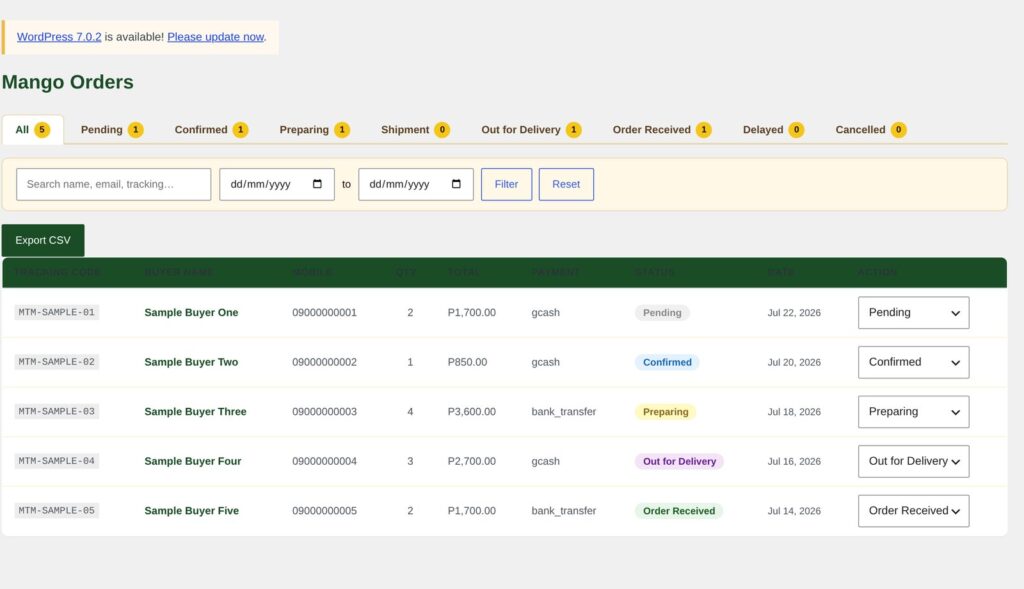
Nobody needs admin just to read orders
Somebody at DTI Guimaras needs to look at the order list. The path of least resistance is to make them a WordPress administrator, and that is exactly how a small site ends up with five of them. Every one of those five can install a plugin, edit a theme file, or delete the site.
Two WordPress words, and getting them the right way round is most of this section. A capability is one named permission, like view_orders or export_orders. That is the whole thing: a string, and a yes or no. A role is a named bundle of capabilities. administrator is a role, and so is subscriber.
Users are assigned roles. Code should ask about capabilities. Those are different questions, and the difference is the entire point of this section.
The plugin defines three roles:
/* bantalamarketing: full admin alias */
$admin = get_role( 'administrator' );
$caps  = $admin ? $admin->capabilities : [];
$caps['manage_orders']     = true;
$caps['export_orders']     = true;
$caps['manage_payment_qr'] = true;
$caps['manage_smtp']       = true;
$caps['view_orders']       = true;

remove_role( 'bantalamarketing' );
add_role( 'bantalamarketing', 'Bantala Marketing', $caps );

/* dti_guimaras: operations */
remove_role( 'dti_guimaras' );
add_role( 'dti_guimaras', 'DTI Guimaras', [
    'read'          => true,
    'manage_orders' => true,
    'view_orders'   => true,
] );

/* admin_readonly: viewer */
remove_role( 'admin_readonly' );
add_role( 'admin_readonly', 'Admin (Read Only)', [
    'read'        => true,
    'view_orders' => true,
] );
add_role() takes three arguments: a slug, a human-readable label for the WordPress admin, and an array of capabilities set to true.
bantalamarketing is me, and I will be honest about it. It copies every administrator capability and then adds five. The code comment calls it a full admin alias because that is what it is. Somebody has to be able to install plugins.
dti_guimaras is operations. They can move orders through the pipeline. They cannot export the CSV, touch the payment QR codes, or open the settings screens.
admin_readonly is read and view_orders, and nothing else. Look, do not touch. There is no version of that a full administrator account can express, which is the whole reason the role exists.
Note the remove_role() before each add_role(). add_role() does nothing if the role already exists, so without the removal, editing this capability list would have no effect on any site where the plugin had already been activated once. The change would work perfectly on a fresh install and silently do nothing everywhere else.
Now the part that catches people out. add_role() writes to the database. Roles are not code. They live in a single row in wp_options. So this function is not a declaration. It is a migration.
Which is why it is called from exactly one place in the plugin:
register_activation_hook( __FILE__, function () {
    BSMF_Database::install();
    BSMF_Roles::register();
    BSMF_Scheduler::schedule();
    BSMF_Order_Handler::protect_uploads_dir();
    flush_rewrite_rules();
} );
register_activation_hook() runs its callback once, when somebody clicks Activate. Put add_role() on an ordinary request hook instead and you would rewrite that options row on every page load of the site, forever, for no benefit at all.
Hold on to that. The scheduling section is the same pair of hooks with the opposite answer, and that is where it hurts.
Ask about the capability, never the role
The permission checks are four one-line helpers:
static function can_manage() {
    return current_user_can( 'manage_orders' );
}

static function can_export() {
    return current_user_can( 'export_orders' );
}

static function can_view() {
    return current_user_can( 'view_orders' ) || current_user_can( 'manage_orders' );
}

static function can_edit_settings() {
    return current_user_can( 'manage_smtp' ) || current_user_can( 'manage_options' );
}
current_user_can() is the WordPress function for “does the logged-in user hold this permission”, and it takes a capability. Look at what is not in that code block: no role name. There is no current_user_can( 'dti_guimaras' ) anywhere in the plugin. Nothing in it knows or cares which role a user holds.
The admin menu is built from those helpers:
static function register_menus() {
    if ( ! BSMF_Roles::can_view() ) return;

    add_menu_page(
        'Mango Orders', 'Mango Orders',
        'view_orders',                       // capability required
        'bsmf-orders',
        [ __CLASS__, 'page_orders_list' ],
        'dashicons-store', 25
    );

    if ( BSMF_Roles::can_manage() ) {
        add_submenu_page( 'bsmf-orders', 'Payment QR Codes', 'Payment QR Codes',
            'manage_payment_qr', 'bsmf-qr-codes', [ __CLASS__, 'page_qr_codes' ] );
    }

    if ( BSMF_Roles::can_edit_settings() ) {
        add_submenu_page( 'bsmf-orders', 'SMTP Settings', 'SMTP Settings',
            'manage_smtp', 'bsmf-smtp', [ __CLASS__, 'page_smtp_settings' ] );
        add_submenu_page( 'bsmf-orders', 'Plugin Settings', 'Plugin Settings',
            'manage_smtp', 'bsmf-settings', [ __CLASS__, 'page_plugin_settings' ] );
    }
}
The third argument to add_menu_page() and add_submenu_page() is a capability. WordPress hides the item from anyone who lacks it, and refuses to load the page if they guess the URL. The whole menu is skipped for a user who cannot view orders at all, so no stray parent menu appears with nothing under it. And adding a fourth role later means writing one add_role() call, with no conditionals to hunt down, because no conditional mentions a role.
One thing a hidden menu item is not: a permission check. Anyone can post to admin-ajax.php directly. So every handler re-checks. The CSV export checks can_export() in the AJAX handler and then again inside the export function itself, which looks redundant until you picture somebody calling the export function from a future cron job that forgot the first check.
The riskiest thing the plugin does
Buyers upload a screenshot of their bank transfer. Accepting files from the public internet is the most dangerous thing in this plugin, and it is worth being precise about why.
Three terms first. A MIME type is the label that says what kind of file something is, like image/jpeg or application/pdf. The browser sends one along with the upload, and it is a claim rather than a fact. Sniffing means working out the type by reading the file’s actual bytes instead of believing the label or the filename. A polyglot is one file that is validly two formats at once: a real JPEG to an image library, and real executable PHP to the PHP interpreter. Both readings are correct, which is what makes it dangerous.
The attack is to get a polyglot saved with a .php extension somewhere the web server will execute it, then request its URL. Now the attacker is running code on your server, and it arrived through a form marked “upload your payment screenshot”.
The first layer of defence runs before anything is written anywhere:
$allowed_types = [ 'image/jpeg', 'image/png', 'application/pdf' ];
$finfo = finfo_open( FILEINFO_MIME_TYPE );
$mime  = finfo_file( $finfo, $file['tmp_name'] );
finfo_close( $finfo );
if ( ! in_array( $mime, $allowed_types, true ) ) {
    return new WP_Error( 'invalid_type', 'Only JPG, PNG, or PDF files are allowed.' );
}

$allowed_exts = [ 'jpg', 'jpeg', 'png', 'pdf' ];
$check    = wp_check_filetype_and_ext( $file['tmp_name'], $file['name'] );
$safe_ext = $check['ext'] ?? '';
if ( ! $safe_ext || ! in_array( $safe_ext, $allowed_exts, true ) ) {
    return new WP_Error( 'invalid_type', 'File type not allowed.' );
}
finfo_open( FILEINFO_MIME_TYPE ) opens PHP’s file-inspection library and tells it to answer with a MIME type and nothing else. finfo_file() then reads the bytes at the path you give it and returns the type it recognises. Neither call has been shown the filename.
That distinction is easy to miss in the code, because the two sit side by side. $file['tmp_name'] is where PHP has already parked the upload on disk. $file['name'] is the name the browser claimed. Only the first is passed to finfo.
wp_check_filetype_and_ext() is a WordPress core function that does the cross-check for you. It sniffs the file, then compares the result against core’s allow-list of extensions and their expected types. It returns an array, and ext comes back empty when the sniffed type and the extension disagree, or when the extension is not on the list at all.
Notice that it takes the submitted filename as its second argument. So the filename is consulted here, as a reason to reject. A perfectly valid JPEG called receipt.php fails this check, because php is not in the allow-list.
The second layer decides what actually gets written:
$allowed_exts = [ 'jpg', 'jpeg', 'png', 'pdf' ];
$mime_to_ext  = [
    'image/jpeg'      => 'jpg',
    'image/png'       => 'png',
    'application/pdf' => 'pdf',
];
$finfo = finfo_open( FILEINFO_MIME_TYPE );
$sniffed_mime = finfo_file( $finfo, $file['tmp_name'] );
finfo_close( $finfo );

$safe_ext = $mime_to_ext[ $sniffed_mime ] ?? '';
if ( ! $safe_ext || ! in_array( $safe_ext, $allowed_exts, true ) ) {
    return new WP_Error( 'invalid_type', 'Only JPG, PNG, or PDF files are allowed.' );
}

$filename = bin2hex( random_bytes( 16 ) ) . '.' . $safe_ext;
This is the direction-of-trust point, and it is the one thing to take from this section. The extension that goes on disk is looked up from the sniffed MIME type. The submitted filename is not an input to that line.
$mime_to_ext[ $sniffed_mime ] ?? '' is an allow-list rather than a deny-list. A sniffed type that is not one of those three keys yields an empty string, and the upload is refused. I do not have to think of every dangerous type, because anything I have not explicitly allowed is already rejected.
The stored name is sixteen random bytes as hex, which kills two more problems for free. No ../ can survive a name that was never used, and two people uploading receipt.jpg cannot overwrite each other.
So the filename can get an upload rejected. It can never decide what lands on disk. Those are different jobs, and it only gets the first one.
Assume I got the validation wrong
Two layers of PHP checks is still not enough, because defence in depth means planning for my own checks being broken.
The plugin tries to help itself by writing a deny from all .htaccess file into the payments directory. On this stack that file does absolutely nothing, because the site runs on nginx and nginx never reads .htaccess at all. I have left it there, since it costs nothing and the plugin may one day run on Apache, but the guard that actually works lives in the nginx config:
location ^~ /wp-content/uploads/mangoestometro/payments/ {
    deny all;
    return 404;
}

location ~* ^/wp-content/uploads/.*\.(php|phtml|phar)$ {
    deny all;
    return 404;
}
The first block means the payments directory is not web-accessible. Not “not listable”, but not reachable at all, for anybody, with any URL. Staff view a screenshot through an admin endpoint that checks a capability, validates the stored path against a strict pattern, and streams the bytes with X-Content-Type-Options: nosniff so the browser cannot be talked into treating a JPEG as something else.
The second block means nothing anywhere under uploads with a PHP-ish extension will execute. If my sniffing turned out to be wrong tomorrow, the attacker would end up holding a file they can neither reach nor run.
One more thing happens before any of the file handling. The submission is checked against Cloudflare Turnstile, verified server-side against Cloudflare’s API rather than trusted from the browser. If no secret is configured, that check fails closed and the submission is rejected, because a misconfigured CAPTCHA that waves everything through is worse than having none at all: you think you are protected. A flood of junk submissions therefore costs a token check rather than a disk write.
A buyer’s name can be code
There is an Export CSV button on the dashboard. It produces fifteen columns of order data for whoever needs to open it in a spreadsheet.
Here is the term. CSV injection works because Excel, Google Sheets and LibreOffice Calc all treat a cell beginning with =, +, -, @, a tab, or a carriage return as a formula. Not as text that resembles a formula. As a formula, to be evaluated on opening.
So a buyer types something like this as their full name:
=cmd|' /C calc'!A0It sits in my database as an ordinary harmless string. It comes back out in the export. Somebody at DTI opens the file, and on a spreadsheet configured to allow it, that runs.
Modern Excel blocks that particular mechanism by default, so it is not the automatic compromise it was ten years ago. But “the victim’s software will probably refuse on my behalf” is not a control I own. Either way my plugin never executed anything. It just delivered the letter.
What makes this one awkward is that the input is, by any reasonable reading, just a name. There is no obviously suspicious field to guard. The fix has to sit at the boundary where the data becomes a spreadsheet:
private static function escape_csv_cell( $v ): string {
    $s = (string) $v;
    if ( $s !== '' && strpbrk( $s[0], "=+-@\t\r" ) !== false ) {
        $s = "'" . $s;
    }
    return $s;
}
$s[0] is the first character, and only the first. That is the whole rule, because a spreadsheet decides formula-or-text from the leading character, so that is the only one worth testing. strpbrk() returns false when none of the characters in its second argument are found, so the condition reads “the first character is one of those six”.
Prefixing a single quote is the spreadsheet convention for “this is literal text”. The quote is consumed on import rather than becoming part of the name.
The quiet work is done by the first line, $s = (string) $v. That cast is what makes $s[0] safe to reach for, since order totals and quantities arrive here as numbers and a number has no character at offset zero. Cast first, then index. The : string on the signature only promises what comes back out, and does nothing at all to what went in.
Then it is wired in as a single map across every cell of every row:
return array_map( [ __CLASS__, 'escape_csv_cell' ], $cells );One line, applied to all fifteen columns. That matters more than it looks. There is no “which fields need escaping?” judgement to get wrong, and a column added next year is escaped without anybody remembering to do it.
How WordPress runs scheduled jobs
WP-Cron is not cron. There is no daemon and nothing is watching the clock. WordPress keeps a list of due jobs in the database and checks that list during ordinary page requests. No visitors, no jobs.
On this stack that default is switched off and replaced with a real system cron entry that pokes WP-CLI every minute, because a shop cannot have its 8am report depend on somebody happening to browse the site at 8am.
The plugin has four cron hooks:
static function register_hooks() {
    add_action( 'bsmf_daily_report',             [ __CLASS__, 'fire_daily_report' ] );
    add_action( 'bsmf_send_review',              [ __CLASS__, 'fire_review_email' ] );
    add_action( 'bsmf_send_reorder_reminder',    [ __CLASS__, 'fire_reorder_reminder' ] );
    add_action( 'bsmf_send_transactional_email', [ __CLASS__, 'fire_transactional_email' ], 10, 2 );
}
Only one of those four is recurring. bsmf_daily_report is scheduled daily and keeps going. The other three are one-shot jobs, queued when something specific happens.
bsmf_send_review is queued when an order reaches order_received, to fire a few hours later, nudged forward if that would land outside office hours. bsmf_send_reorder_reminder has the same trigger, seven days out. And bsmf_send_transactional_email is queued immediately on a status change, so that a slow mail server cannot make the dashboard feel broken. Sending inline is still available as an option, but asynchronous is the default.
The mistake that makes a job silently never run
This is the most useful thing in this post for someone new to WordPress, so it gets its own section.
add_action() does not schedule anything. It says exactly one thing: “when this hook name fires, call this function.” That is a listener registration, and the listener exists only for the request that registered it. PHP forgets everything when the request ends.
Scheduling is a separate act. wp_schedule_event() writes a row saying “fire the hook bsmf_daily_report at this timestamp, and every day after that”.
So two things must both be true at the moment a job comes due. The event has to be in the database, which is done once, at activation. And a listener has to be attached on whichever request happens to run it, which has to mean every request, because you cannot know in advance which one that will be.
Now the trap. Putting add_action() inside your activation routine looks entirely reasonable. It is setup code, and activation is where setup goes. Here is what you get. The event is queued, correctly. The hook fires on schedule, correctly. Nothing is listening, because the request that attached the listener ended weeks ago. So nothing happens, and there is no error, no warning and no log line.
The job just never runs, and you find out when someone asks why they stopped getting the report. It is the hardest class of bug to find, because there is no failure to go and look at. There is only an absence.
So in this plugin the two are kept deliberately apart:
/* Activation: runs once, ever. Queues the event. */
register_activation_hook( __FILE__, function () {
    BSMF_Database::install();
    BSMF_Roles::register();
    BSMF_Scheduler::schedule();        // wp_schedule_event()
    BSMF_Order_Handler::protect_uploads_dir();
    flush_rewrite_rules();
} );

/* Boot: runs on every single request. Attaches the listeners. */
add_action( 'plugins_loaded', function () {
    ...
    BSMF_Scheduler::register_hooks();  // add_action() x 4
    ...
} );
Read that as a pair. schedule() is in the activation hook and contains no add_action() calls. register_hooks() is on plugins_loaded, which fires on every request, and contains nothing but add_action() calls.
Then compare it with add_role() from earlier. Same two hooks, opposite answers. add_role() writes a database row, so it belongs at activation and would be pure waste on every request. add_action() writes nothing and survives nothing, so it belongs on every request and is useless at activation.
The question to ask is not “is this setup?”, because both of them look like setup. It is “does this persist?” If the call leaves something behind in the database, run it once. If it only configures the current request, run it every time.
There is a unit test holding that in place. It calls the activation routine with add_action() stubbed out, and asserts the list of registered hooks came back empty. If someone ever moves a listener back into activation, a test fails instead of a report quietly not arriving.
One smaller thing while we are here. The report time is not a constant. It is an option, and changing it in the settings screen clears the queued event and schedules a new one, computed explicitly in Asia/Manila rather than trusting whatever timezone the container thinks it is in. Moving the report an hour later is a form submission, not a deployment.
Two rules I did not let myself skip
The test had to fail first. Every change shipped with a test written before the code, and I had to watch it fail for the reason I expected.
A test that has never failed proves nothing. It might be asserting against a mock of itself. Watching it go red for the right reason is the cheapest available evidence that it is checking the thing you think it is checking, and it takes about thirty seconds.
Every change got two independent reviews. Not one reviewer twice. Two reviewers who had not seen each other’s findings.
The disagreements turned out to be the valuable part. Where two reviewers with different priors both flagged the same line, it was almost always a real defect. Where they disagreed, the argument surfaced an assumption nobody had written down.
For something that handles other people’s money and home addresses, that is a proportionate amount of ceremony. It is also the only reason a later maintainability pass was safe to attempt at all.
What I would do differently
The plugin is still called bantala-smtp-form. It was a contact form once. It now owns the order lifecycle, three roles, file uploads, four cron hooks and a CSV exporter, and the SMTP part is a footnote. Rename things when their scope changes. The cost of not doing it never arrives as one expensive moment. It just quietly taxes every future conversation about the codebase.
The bigger regret is the state machine. It did not begin as a matrix at all. Git says it started as a local $transitions variable inside the AJAX handler that answered the dashboard’s status dropdown. Seven states, sitting in the middle of a function whose real job was parsing $_POST. delayed came later, which is when it became eight.
It took a deliberate refactor to lift it out into its own class as a private const, with the validation, the log write and the side effects alongside it. That is where it should have started. It is the most valuable thing in the plugin and the easiest thing to test, and for a while it was neither, because it was welded to an HTTP handler.
Read next
Building an accessible WordPress order form covers the front end of the same order flow.
The store this plugin runs is at mangoestometro.com.